In the world of internet and networking, jitter and latency are two terms that often confuse beginners. Imagine you are on a video call with a friend. Your voice reaches instantly sometimes, but other times it gets delayed or breaks into uneven chunks.
That delay and inconsistency are what we call jitter and latency in simple words. When we talk about difference between jitter and latency, we are actually discussing how smoothly or slowly data travels across a network.
Many learners struggle to understand jitter and latency because both affect internet speed, but in different ways. In this article, we will clearly explain jitter and latency, their meanings, and how they impact real-life digital communication.
Key Difference Between Jitter and Latency
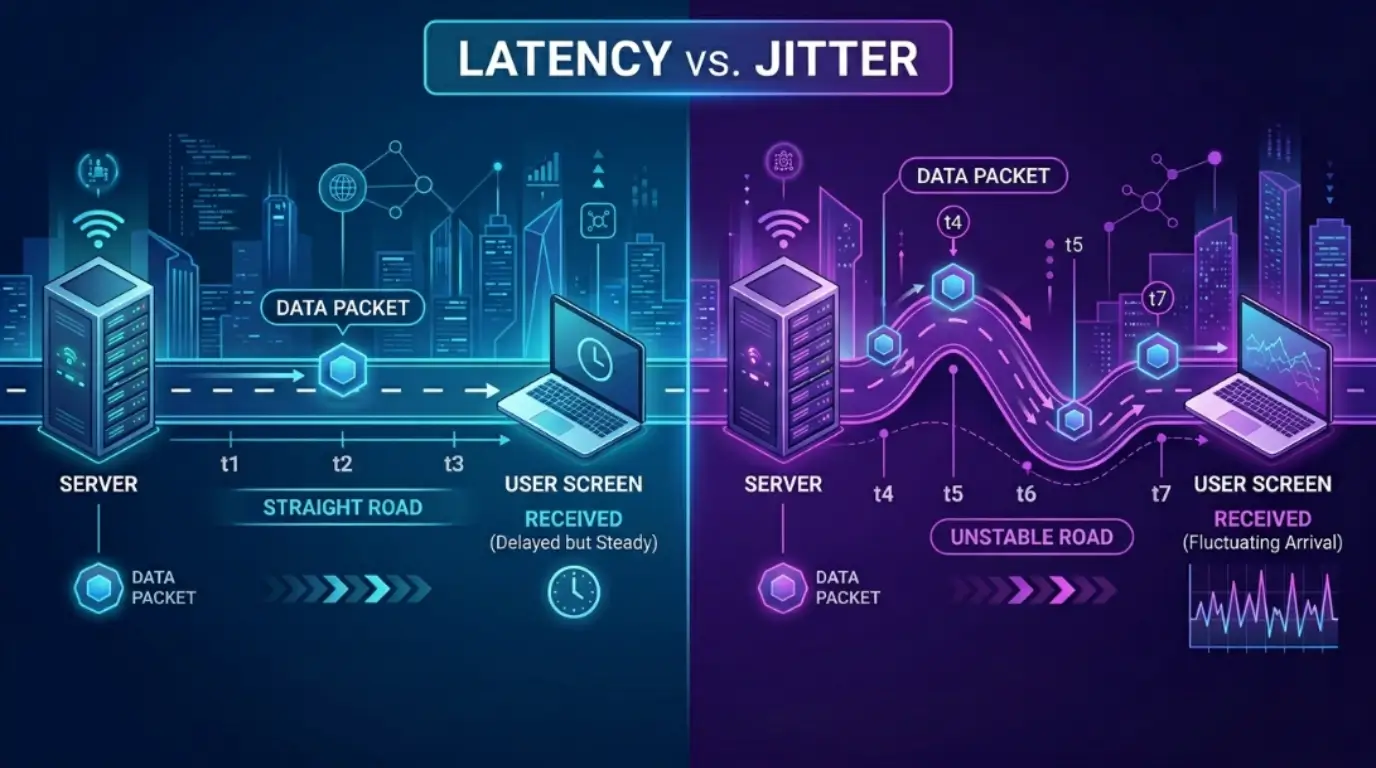
- Latency refers to the time it takes for data to travel from source to destination.
- Jitter refers to the variation in that delay over time.
Latency is about delay, while jitter is about consistency of delay.
Why Knowing the Difference Between Jitter and Latency Matters
Understanding the difference between jitter and latency is important for students, IT professionals, gamers, and even regular internet users. Poor understanding can lead to bad network decisions like choosing the wrong internet plan or misunderstanding connection issues. In society, where online education, remote work, and video streaming are common, knowing the difference between jitter and latency helps improve communication quality and reduces frustration. Engineers use this knowledge to build faster networks, while gamers rely on it for smooth gameplay. So, learning the difference between jitter and latency is not just technical—it is practical for everyday digital life.
Pronunciation of Jitter and Latency (US & UK)
- Jitter
- US: /ˈdʒɪtər/
- UK: /ˈdʒɪtə/
- Latency
- US: /ˈleɪtənsi/
- UK: /ˈleɪtənsi/
Now that we understand how to pronounce both terms, let’s move deeper into the difference between jitter and latency in detail.
10 Key Differences Between Jitter and Latency
1. Meaning
- Latency: Time taken for data to reach destination.
- Example 1: Clicking a website takes 200ms to load.
- Example 2: Sending a message takes 1 second to deliver.
- Jitter: Variation in time delay.
- Example 1: Video call voice keeps breaking unevenly.
- Example 2: Online game movement feels unstable.
2. Nature
- Latency: Fixed delay measurement.
- Example 1: Satellite internet has high latency.
- Example 2: Fiber internet has low latency.
- Jitter: Fluctuating delay.
- Example 1: Zoom call audio cuts randomly.
- Example 2: Streaming voice becomes choppy.
3. Measurement
- Latency: Measured in milliseconds (ms).
- Example 1: 50ms ping in gaming.
- Example 2: 120ms video response delay.
- Jitter: Measured as variation in ms.
- Example 1: 5ms fluctuation in call.
- Example 2: 20ms uneven packet delivery.
4. Impact on Communication
- Latency: Causes delay in response.
- Example 1: Late reply in chat.
- Example 2: Slow website interaction.
- Jitter: Causes distortion or lag spikes.
- Example 1: Robotic voice in calls.
- Example 2: Frozen video frames.
5. Stability
- Latency: Can be stable even if high.
- Example 1: Constant 100ms ping.
- Example 2: Fixed satellite delay.
- Jitter: Always unstable by nature.
- Example 1: 10ms to 60ms variation.
- Example 2: Random voice drops.
6. Effect in Gaming
- Latency: Causes input delay.
- Example 1: Late shooting response.
- Example 2: Delayed movement control.
- Jitter: Causes teleporting effect.
- Example 1: Character jumps unpredictably.
- Example 2: Sudden lag spikes.
7. Cause
- Latency: Distance or routing.
- Example 1: Overseas server delay.
- Example 2: Slow ISP routing.
- Jitter: Network congestion.
- Example 1: Too many users online.
- Example 2: Packet queue overload.
8. User Experience
- Latency: Feels slow but smooth.
- Example 1: Delayed loading page.
- Example 2: Slow but steady video.
- Jitter: Feels broken and unstable.
- Example 1: Voice distortion.
- Example 2: Video freezes.
9. Control
- Latency: Hard to reduce completely.
- Example 1: Long-distance servers.
- Example 2: Ocean cable delay.
- Jitter: Can be reduced easily.
- Example 1: Better router setup.
- Example 2: QoS configuration.
10. Technical Role
- Latency: Core network metric.
- Example 1: Ping tests.
- Example 2: Server response time.
- Jitter: Quality stability metric.
- Example 1: VoIP quality check.
- Example 2: Streaming stability test.
Nature and Behaviour of Jitter and Latency
Latency behaves like a steady stopwatch—it measures how long data takes to travel, regardless of conditions. It is predictable but can be high or low depending on distance and infrastructure.
Jitter, on the other hand, behaves like an uneven heartbeat. It changes constantly, creating instability in communication. Even if latency is low, high jitter can still ruin the experience.
Why People Get Confused About Jitter and Latency
People often confuse the difference between jitter and latency because both affect speed and performance. In real-life usage, both appear together during video calls, gaming, or streaming. Since both cause “lag,” users assume they are the same. However, latency is about delay, while jitter is about inconsistency in that delay.
Which Is Better in Different Situations?
In real-world networking, neither jitter nor latency is “better”—they serve as performance indicators. Low latency is ideal for gaming, browsing, and real-time communication. Low jitter is essential for video calls and streaming stability. If latency is low but jitter is high, communication becomes unstable. If jitter is low but latency is high, communication is smooth but slow. Therefore, both must be optimized together for the best digital experience.
Metaphors and Similes
- Latency is like a straight highway with traffic delay.
- Jitter is like a bumpy road where speed keeps changing.
Example:
- “His response had latency like a slow train arriving late.”
- “Her voice had jitter like a shaky radio signal.”
Connotative Meaning
- Latency: Neutral term (technical delay, neither good nor bad).
- Jitter: Negative term (represents instability or disturbance).
Examples:
- High latency = slow but stable connection.
- High jitter = poor and broken communication.
Idioms or Expressions
While there are no direct idioms for jitter and latency, we can use related expressions:
- “Slow on the uptake” → relates to high latency
- “All over the place” → relates to jitter
Examples:
- His connection was slow on the uptake during the call.
- The audio was all over the place due to jitter.
Literature and Movie References
There are no famous literature works or movies directly named after jitter and latency, as these are technical networking terms. However, they are widely discussed in modern technology books, IT research papers, and network engineering studies.
Frequently Asked Questions
1. What is the main difference between jitter and latency?
Latency is delay; jitter is variation in delay.
2. Can latency exist without jitter?
Yes, a connection can have high but stable latency.
3. Which is worse: jitter or latency?
High jitter is usually worse for real-time communication.
4. How can I reduce jitter?
Use stable internet, wired connection, and QoS settings.
5. Does gaming depend on both?
Yes, both jitter and latency affect gaming performance.
Final Conclusion
Understanding the difference between jitter and latency is essential in today’s digital world where communication, gaming, and streaming depend on network performance.
While latency measures how long data takes to travel, jitter measures how consistent that travel time is. Both play a critical role in shaping user experience. High latency causes slow response, while high jitter causes instability.
For smooth digital communication, both must be kept low. Whether you are a student, gamer, or professional, knowing the difference between jitter and latency helps you make better choices in internet usage and troubleshooting.