PNG and SVG are two of the most common image formats used in the digital world. Imagine a business owner creating a website logo.
They want the logo to look sharp on a mobile phone, laptop, and giant billboard. Choosing between PNG and SVG can make a huge difference in quality and performance.
The difference between PNG and SVG is an important topic for designers, developers, marketers, and students.
While both formats are used for digital graphics, they work in very different ways. Understanding the difference between PNG and SVG helps users select the right format for websites, logos, illustrations, and images.
Many people search for the difference between PNG and SVG because both formats appear similar at first glance. However, their strengths, limitations, and ideal use cases are quite different.
In this article, you will learn the difference between PNG and SVG, their features, practical uses, similarities, and when each format works best.
Key Difference Between PNG and SVG
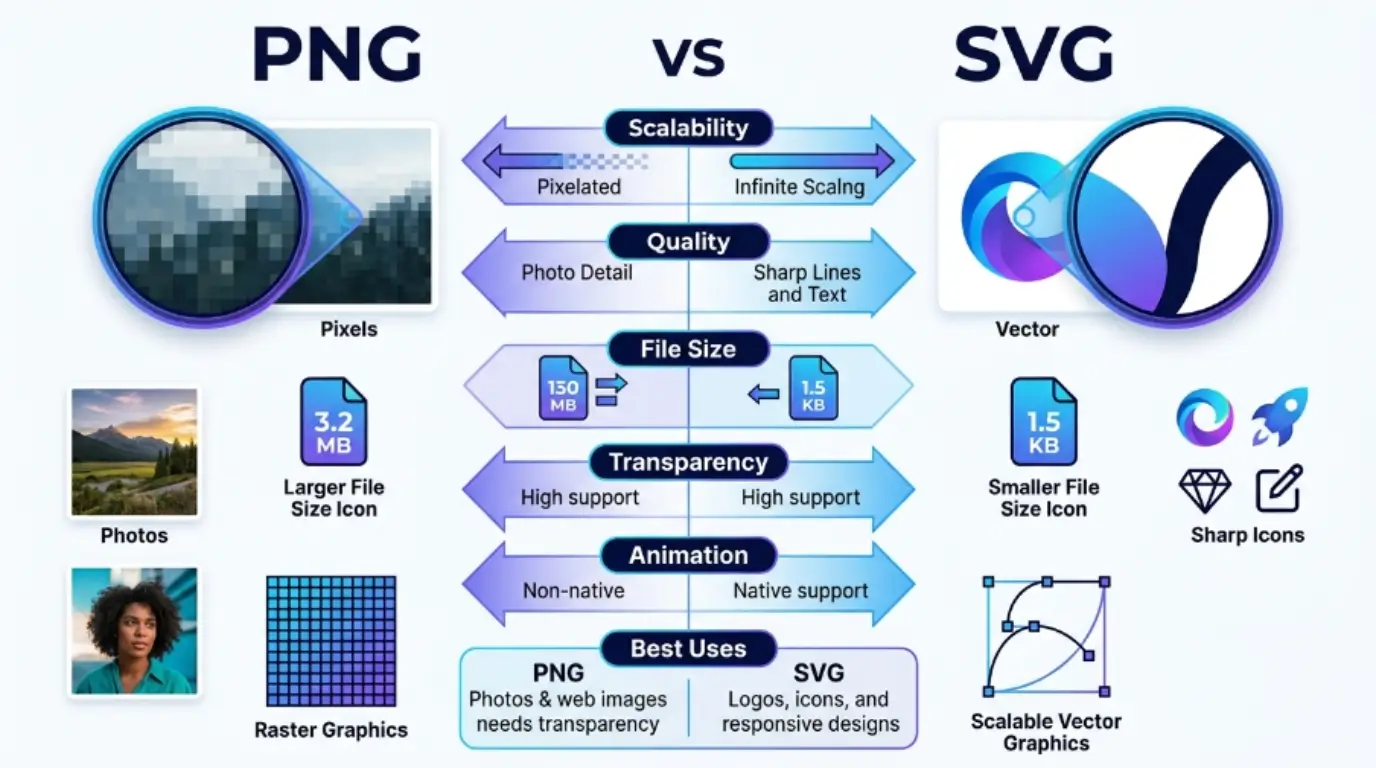
The main difference is that PNG is a raster image format made of pixels, while SVG is a vector image format made of mathematical paths and shapes.
PNG images lose quality when enlarged, but SVG images remain sharp at any size.
Why Is It Important to Know the Difference Between PNG and SVG?
Knowing the difference helps designers create better graphics, developers improve website performance, and businesses maintain professional branding.
For learners, understanding image formats improves digital skills. For experts, choosing the correct format can reduce loading times, improve scalability, and enhance user experience. In modern society, digital content appears everywhere, making image format knowledge valuable for almost everyone.
Pronunciation of PNG and SVG
PNG
US: Pee-En-Gee
UK: Pee-En-Gee
SVG
US: Ess-Vee-Gee
UK: Ess-Vee-Gee
Now that you understand the basics, let’s explore the detailed differences between PNG and SVG.
Difference Between PNG and SVG: 10 Detailed Points
1. File Structure
PNG stores images as pixels.
SVG stores images as mathematical instructions.
Examples:
PNG:
- A digital photograph
- A screenshot
SVG:
- A company logo
- A website icon
2. Scalability
PNG loses quality when enlarged.
SVG remains sharp regardless of size.
Examples:
PNG:
- Enlarged photo becomes blurry
- Zoomed screenshot appears pixelated
SVG:
- Large billboard logo remains clear
- Mobile app icon stays sharp
3. Image Quality
PNG offers excellent quality for detailed images.
SVG provides perfect quality for graphics and illustrations.
Examples:
PNG:
- Product images
- Portrait photographs
SVG:
- Brand logos
- Infographics
4. File Size
PNG files can become large.
SVG files are often smaller for simple graphics.
Examples:
PNG:
- High-resolution wallpaper
- Large product catalog image
SVG:
- Website icon
- Navigation symbol
5. Editing Flexibility
PNG editing often requires image software.
SVG editing is easier through code or vector editors.
Examples:
PNG:
- Editing with Photoshop
- Retouching photographs
SVG:
- Editing in Illustrator
- Modifying XML code
6. Best Use Cases
PNG works best for detailed visuals.
SVG works best for scalable graphics.
Examples:
PNG:
- Social media posts
- Digital artwork
SVG:
- Logos
- User interface elements
7. Loading Speed
PNG may load slower if large.
SVG often loads faster for simple graphics.
Examples:
PNG:
- Large banner image
- High-resolution background
SVG:
- Website icon set
- Simple illustrations
8. Transparency Support
Both support transparency.
SVG offers more flexibility with transparent vector elements.
Examples:
PNG:
- Transparent product image
- Transparent sticker
SVG:
- Transparent logo
- Transparent icon
9. Animation Support
PNG does not support built-in animation.
SVG supports animation through CSS and JavaScript.
Examples:
PNG:
- Static image
- Fixed graphic
SVG:
- Animated icon
- Interactive illustration
10. Search Engine Accessibility
PNG content cannot be easily read by search engines.
SVG code can contain searchable text.
Examples:
PNG:
- Text embedded in image
- Screenshot with words
SVG:
- Searchable logo text
- Accessible web graphics
Nature and Behavior of PNG
PNG is a raster-based image format designed to preserve image quality. It is commonly used for photographs, screenshots, and images requiring transparency. PNG behaves like a grid of colored pixels. As image size increases, quality can decrease.
Nature and Behavior of SVG
SVG is a vector-based image format built using mathematical equations. It is highly scalable and ideal for logos, icons, and illustrations. SVG behaves dynamically and can be resized without losing quality.
Why Are People Confused Between PNG and SVG?
People often confuse PNG and SVG because both are image formats used online. Both can display transparent backgrounds and appear visually similar on websites. However, their underlying technology is completely different. PNG relies on pixels, while SVG relies on vectors.
PNG vs SVG: Differences and Similarities Table
| Feature | PNG | SVG |
| Format Type | Raster | Vector |
| Based On | Pixels | Mathematical Paths |
| Scalability | Limited | Unlimited |
| File Size | Larger | Smaller for simple graphics |
| Animation | No | Yes |
| Transparency | Yes | Yes |
| Logos | Good | Excellent |
| Photos | Excellent | Poor |
| Editing | Image Software | Vector Editors |
| Web Performance | Moderate | High |
Similarities
| Similar Feature | PNG | SVG |
| Digital Images | Yes | Yes |
| Transparency | Yes | Yes |
| Web Compatible | Yes | Yes |
| Design Usage | Yes | Yes |
Which Is Better and When Should You Use PNG?
PNG is better when displaying photographs, screenshots, and highly detailed images. It preserves visual details and supports transparency. If your project involves realistic pictures, PNG is usually the better option.
Which Is Better and When Should You Use SVG?
SVG is better when creating logos, icons, diagrams, and scalable graphics. Since SVG remains sharp at any size, it is perfect for responsive websites and modern user interfaces. For branding and web design, SVG is often the preferred choice.
PNG and SVG as Metaphors and Similes
PNG as a metaphor:
- Like a printed photograph frozen in time.
- Like a detailed painting with fixed dimensions.
SVG as a metaphor:
- Like a blueprint that can expand endlessly.
- Like a rubber band that stretches without breaking.
Similes:
- PNG is like a photo album page.
- SVG is like a perfectly scalable map.
Connotative Meaning of PNG
Positive:
- Reliable
- Detailed
- Professional
Neutral:
- Standard image format
- Common web graphic
Negative:
- Large file size
- Limited scalability
Examples:
- The designer trusted PNG for product photos.
- The PNG file became too large for quick loading.
Connotative Meaning of SVG
Positive:
- Flexible
- Modern
- Scalable
Neutral:
- Technical graphic format
- Vector-based design
Negative:
- Less suitable for photographs
- Can require technical knowledge
Examples:
- SVG provided a modern solution for the logo.
- Beginners sometimes find SVG editing difficult.
Idioms or Proverbs Related to PNG and SVG
There are no traditional idioms specifically about PNG or SVG.
However, related expressions include:
- A picture is worth a thousand words.
- The bigger picture matters.
- Draw the line.
- Paint a clear picture.
Examples:
- SVG helps businesses paint a clear picture of their brand.
- PNG allows photographers to capture the bigger picture.
PNG and SVG in Literature and Publications
PNG:
- Commonly used in web design books
- Featured in digital media guides
- Discussed in graphic design manuals
SVG:
- Featured in web development textbooks
- Included in vector graphics publications
- Discussed in UX and UI design resources
Movies, Documentaries, or Media Related to PNG and SVG
No major movies are specifically named PNG or SVG.
However, both formats are heavily used in:
- Web design tutorials
- Digital art documentaries
- Technology education programs
- Graphic design training courses
Frequently Asked Questions
What is the main difference between PNG and SVG?
PNG uses pixels, while SVG uses vectors.
Is SVG better than PNG?
It depends on the project. SVG is better for logos and icons, while PNG is better for photographs.
Can SVG replace PNG?
Not completely. Each serves different purposes.
Which format is best for logos?
SVG is usually the best format for logos.
Which format has better quality?
SVG maintains quality at any size, while PNG provides excellent quality for detailed images.
How PNG and SVG Are Useful in Our Surroundings
PNG and SVG play important roles in everyday digital life. PNG helps display photographs, screenshots, and product images on websites and social media platforms. SVG powers logos, icons, diagrams, and scalable web graphics. Together, they improve communication, branding, education, and online experiences. From mobile applications to business websites, these formats make digital content more attractive and accessible.
Conclusion
Understanding the difference between PNG and SVG is essential for anyone working with digital graphics. Although both formats serve important purposes, they are designed for different tasks.
PNG excels at displaying detailed images and photographs, while SVG shines when creating scalable graphics, logos, and icons.
The best choice depends on your specific needs. If you require detailed visual content, PNG is often the better option.
If you need flexibility, scalability, and efficient web performance, SVG is usually the superior choice.
By understanding the strengths and limitations of both formats, designers, developers, learners, and businesses can make smarter decisions and create better digital experiences.